Introduction
In collaboration with Liam Salas, Stefan D'Souza, and Olivia Musenga
JumpStartCSR is a Seattle-based company that uses their artificial intelligence,
called “Holmz,” to make recommendations about a person’s health. It uses biometric
data obtained from wearable technology such as smartwatches to guide these recommendations.
JumpStartCSR wanted to break into the college sports industry. We were tasked with designing
a UI that could help integrate Holmz, a medical AI tool, into the workflow of athletic training
and coaching staff. JumpStartCSR has a history in rehabilitation treatment with veterans and
warfighters and wanted to apply their medical AI tool into collegiate athletics.
Problem Space
Our research has indicated to us that medical sports staff have only a limited time and
permission when working with athletes, which makes it difficult to provide the best possible healthcare.
Problem Statement and Research Question
We narrowed our scope down to focus on this demographic, with the following guiding points:
Problem Statement: Medical sports staff are often tasked with seeing numerous athletes in a short amount of time.
This time constraint prevents ATs from providing the absolute best quality of healthcare because they do not
have the time to review every aspect of an athlete’s health in depth.
How might we utilize the Holmz AI to assist athletic trainers, coaches, and other relevant staff?
Goals
We aimed to enable medical sports staff to do their best quality work by...
- Providing them the information needed to actually do that work
- Developing a product that respected patient privacy
- Making something that could be used by other sports professionals such as coaches and physical therapists
- Cutting down on busy work and time commitment
User Research
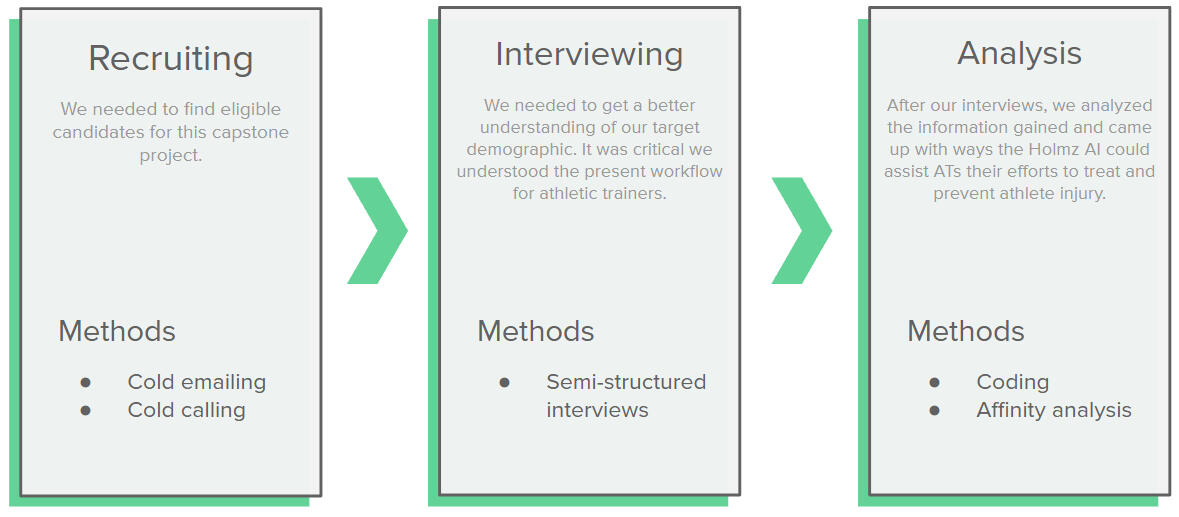
Our overall research process.
We first decided on finding interviewees instead of surveying, as we had limited survey takers in the first place.
Interview Inclusion Criteria
Inclusion
- Works directly with athletes
- Understands the processes of working with athletes
- High school and collegiate coaches and athletic training staff
- Works in sports-medicine or coaches
Exclusion
- Does not work directly with athletes to monitor physical health
Interview Questions
- Please explain your relationship to sports medicine.
- What do you do? Which sport(s) are you primarily involved with? What is the nature of your involvement?
- JumpstartCSR focuses on a couple services, including preventing injuries (repetitive stress and overexertion), detecting
TBI’s, and helping athletes return to play. Would you be able to tell us your thoughts on these areas and how you might
value services and aid in these areas based on your experience?
- Request them to elaborate as needed.
- Walk me through the process of (depending on the answer above):
- Pre-injury: Preventing an athlete from getting injured/monitoring athlete performance and health
- Post-injury: Treating injuries and helping athletes return to play
- Question: What are the key points in an athlete’s health you need to monitor?
- How do you identify if your athletes are doing anything to put themselves in harm’s way with their current mechanics?
- What are the current tools or methods you use to assist the above process?
- Could you describe a time when this tool was the most beneficial for your job?
- What are some limitations of the tools that you’re using, and what kind of data do you wish they could tell you?
- How would you want to improve the current process?
- What information about your patient/athletes do you not currently know that you wish you had knowledge of?
- Is there anybody you might be able to refer us to for a similar discussion?
- Would it be possible to sit in and watch a practice for a field observation?
- We are working to develop a UI — would you be willing to meet again sometime to talk some more and test some prototypes?
Recruitment Process
The recruitment process was one of the most challenging components of this project. We cold-called/emailed over 150 potential participants,
went in person to the athletic offices at UW, and asked for any connections that JumpStartCSR could provide us.
We ultimately landed five participants that fit our inclusion criteria, spanning specific job titles from Athletic Trainers to Athletic Directors.
Interview Process
Our goal was to understand their current workflows and pain points in order to build a product that caters to their needs. Each interviewee gave us
insight into what it is like to work in their roles (including coaches, athletic directors, and athletic trainers), and we were able to dive into
what their work-related limitations were. This helped us find specific, tangible ways that the Holmz AI can be integrated within their preexisting
workflows and solve problems they have in their workspace. It is also where we identified that there was a disproportionately large opportunity
for implementation with, specifically athletic trainers.
Results and Findings
To analyze the data we had accumulated, we went through the transcripts and coded useful information. Afterwards, we conducted an affinity analysis.
For each interviewee, we separated out key bits of information and grouped them together in logical groups. This helped us find patterns across the
participants we interviewed. These insights helped our design moving forward.
We also wrote out short summary reports for each candidate. This helped us become more familiar with each interviewee’s specific needs.
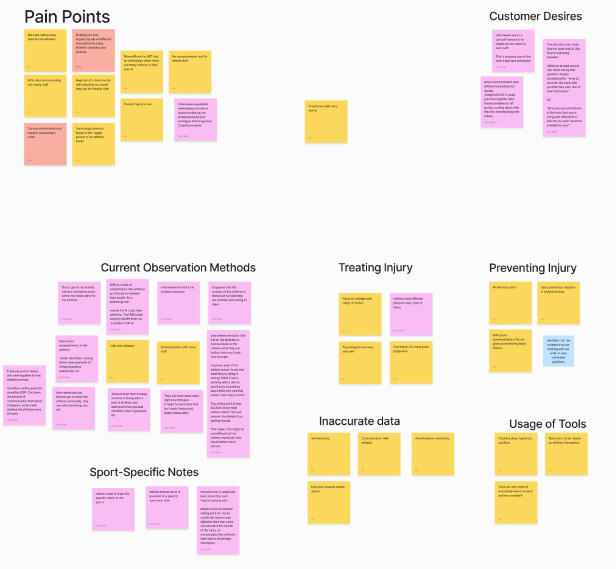
An affinity map we used to
arrange our insights and codes.
Key Takeaways
- There are standardized mobility and screening tests which most athletic trainers (ATs) use to gauge the health of different musculoskeletal groups.
- ATs were very interested in the sleep, fuel, and hydration habits of their athletes and emphasized the importance of its relation to health.
- Self-reported data could be unreliable, especially in the context of health assessment and adherence to prescribed plans. Athletes have to self-report
certain measures that are subjective between people.
After assessing our takeaways from the interview process, we decided to finalize a focus on Athletic Trainers (ATs), while aiming to design in a way that would
still empower coaches and other sports professionals, as well as serve as a bridge for ATs to communicate any data they needed to them using hard and set metrics.
We made this decision due to the opportunity to use AI to help reduce ATs time crunch as well as to help improve the ease of access that they would have to quick and
accessible metrics. The desire for information on adherence as well as sleep-fuel-hydration were core needs that we believed we could match, especially in
a way that caters to the AT demographic’s needs.
Design and Prototype
Brainstorming, Wireframes, and Task Flows
After finalizing our scope, our group focused on brainstorming the content that would be within our user interface. We referenced the research that we had gathered
in order to brainstorm the ideas that we wanted to include. We also created an information architecture and created wireframes in order to determine which content
would be available and where they would be placed.
We also created central user task flows and based our design decisions on them. These task flows are:
- An athletic trainer (AT) needs to evaluate an athlete's readiness to perform (RTP).
- An AT wants to access the training plan developed by the AI to improve an athlete's RTP.
- Edit performance plan by adding leg press to the series of exercises.
- Open a player’s profile through calendar appointments for that day.
Planning and Sketches
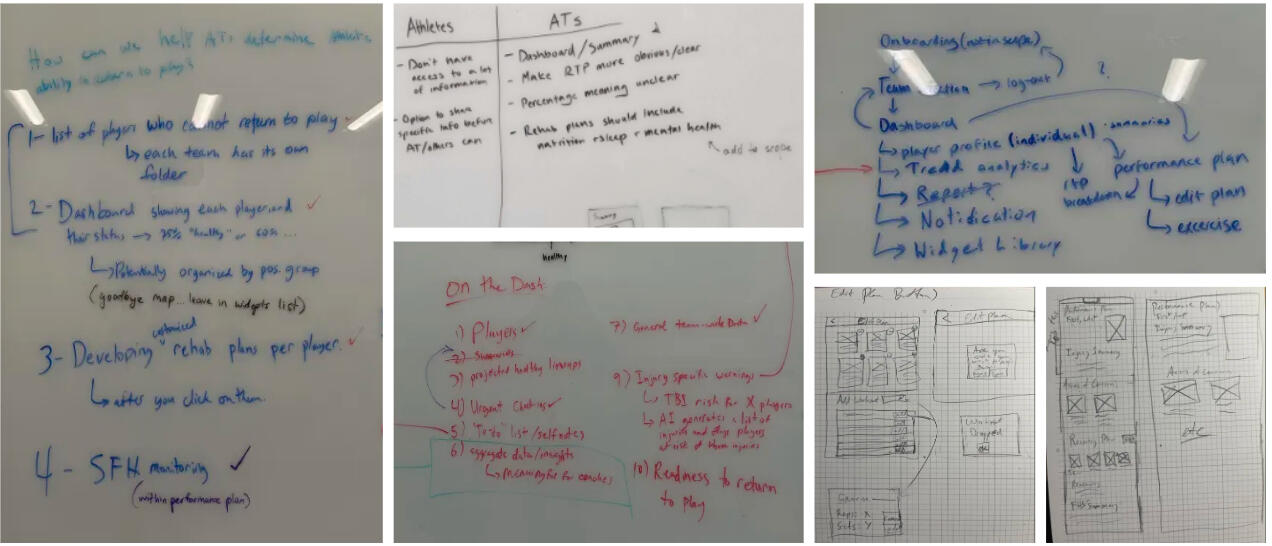
A collage of our planning, brainstorming, organizing, and sketching!
Mid-Fidelity Design
Within our mid-fidelity design, we focused on the general composition of information being laid out. We also worked to begin implementing interactions in order to build
a prototype we could model user tests on if needed.
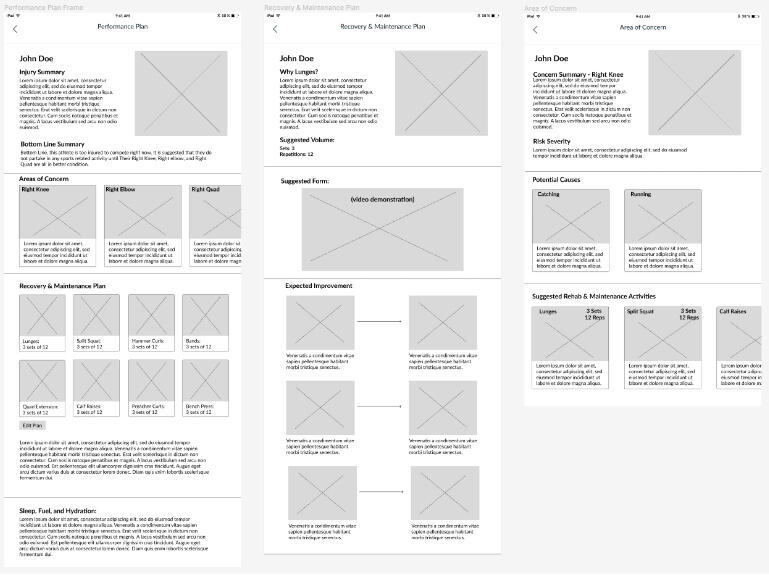
A portion of our mid-fi prototype.
Usability Testing and Iteration
Usability Testing Process
For this stage we had 4 usability test participants, of which all of whom were current or previous athletic trainers. We focused on the four main user flows that we had
come up with previously. By testing these flows that the user interface revolved around, we were able to test the effectiveness of our user interface and make changes to
places that were needed.
In our usability testing process, we shared a Figma prototype link with our participants. From there, we asked them to share their screen, then requested they complete a
series of tasks utilizing our core task flows, while speaking their thoughts out loud. We recorded these meetings and took notes on core takeaways from them. We also asked
for their feedback in order to get a better understanding of anything we might not have tested for specifically, and to gain insight into their approach.
We assured users that it was the product, not them, which was being tested, and their input was effective. After the testing, we walked them through any task
that they had struggled with if they were interested in finding out the current process. Some even offered suggestions!
Prototype Iteration
When we had finished conducting usability testing, the overall reception that we had received was very positive. However, there were a few core things that
we adjusted from the feedback we received.
- Positioning of calendar on dashboard page
- Display of performance plans in dashboard page
Final Deliverables
Dashboard
From our usability testing, we found that ATs are most interested in seeing daily agenda and upcoming appointments on the dashboard. Thus, we designed the dashboard to
clearly and quickly present any upcoming appointments. Additionally, we provided the ability to access player profiles directly from the calendar and important notifications
such as pending appointments.
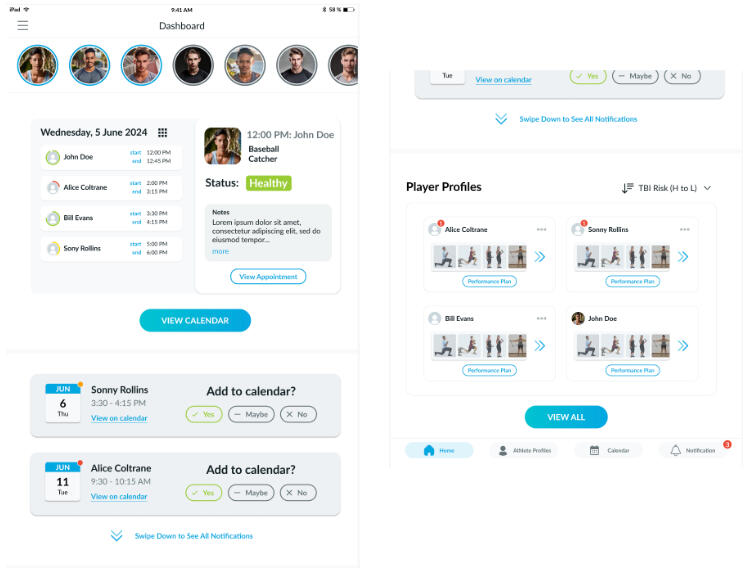
Our high-fidelity prototype's dashboard page!
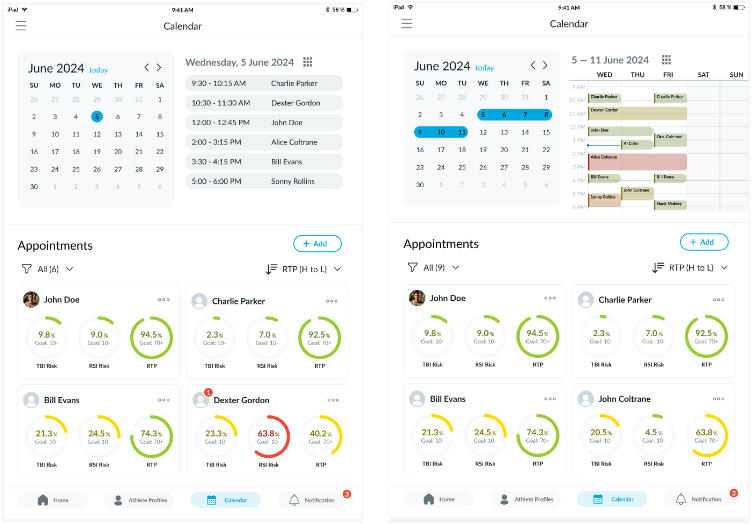
Calendar
Another takeaway from our usability was that ATs wanted an “all-in-one” application to organize information from different places. For this reason, we decided to add a
calendar through which ATs can navigate to different parts of the UI (e.g. player profile, weekly plan). Calendar could sort by different levels of risk factors so that
ATs can more easily find information they are looking for.
We wanted to offer different ways to view the calendar which would easily reflect information that ATs are interested in. This includes the ability to see appointments
for one specific player across a desired number of days. We also used a green-yellow-red color scale to clearly label the health status of each player for the convenience
of ATs.
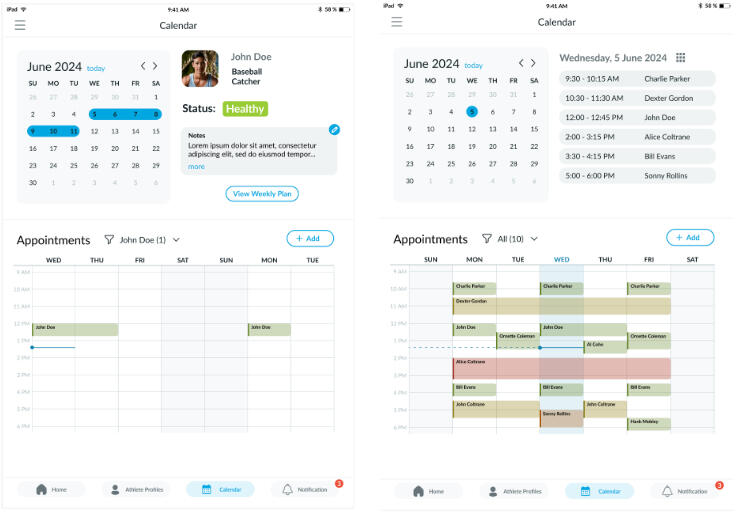
Our high fidelity prototype's calendar pages!
Player Profile
The athlete profile gives a general overview of the health and recovery of an athlete. ATs can also access the performance plan, player history, and directly schedule
appointments for them. This is designed to be a “central” place through which any information about that specific athlete can be found. It provides the most important
information first in an easily digestible format and makes it easy for the AT to navigate to different pages with more in-depth analysis/reports.
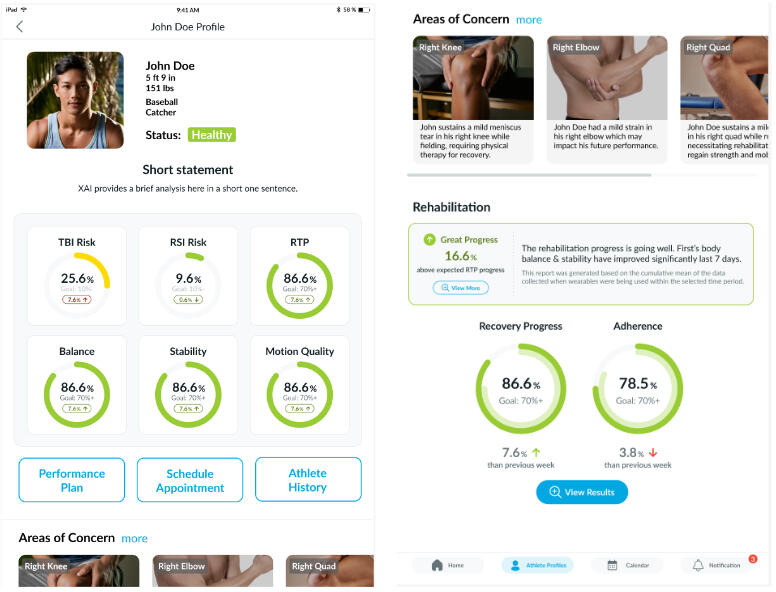
Our high fidelity prototype's player profile page!
Performance Plan
This area provides a quick overview/summary of an athlete’s progress and main areas of concern. It is also the place through which ATs can view and edit the current
Recovery & Maintenance Plan for an athlete.
We decided to add a page explaining each exercise. Having this available online can reduce extra steps and help congregate information to athletes. We also added a
page focusing on specifically different areas of concern, which could be used to help prevent future injury and recover from current injury by using Holmz to suggest
rehabilitation/maintenance plans and predict potential causes.
We designed the weekly plan so it can be customized on a day-to-day basis within the week. This way, ATs can view the entire week at a glance without having to click
through anything. We made it very easy to edit the treatment program for.
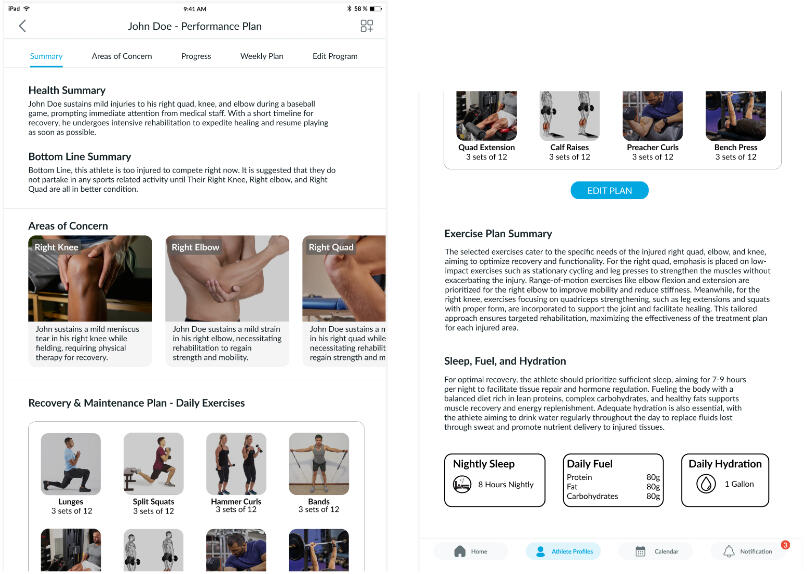
A portion of our performance plan page!
Other Deliverables
Storyboard Prototype
When brainstorming ideas for the video, we came up with a plan to portray a “before and after” scenario.We wrote a script based on the previous processes. Due to our
meticulous preparation, the filming experience was smooth and straightforward.
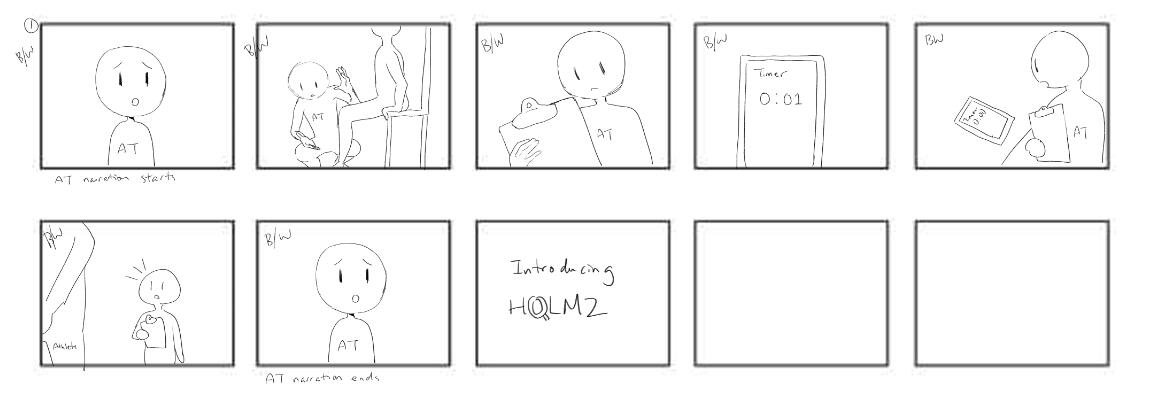
A portion of our storyboard for the video prototype!
Poster
We used JumpStartCSR’s style guide to guide the design decisions which we made within this poster. The other aspects were based off of our work in our project’s research,
prototype iteration, and final design.
With the poster, we communicated to a real-life audience of HCDE capstone showcase goers about our project with JumpStartCSR!
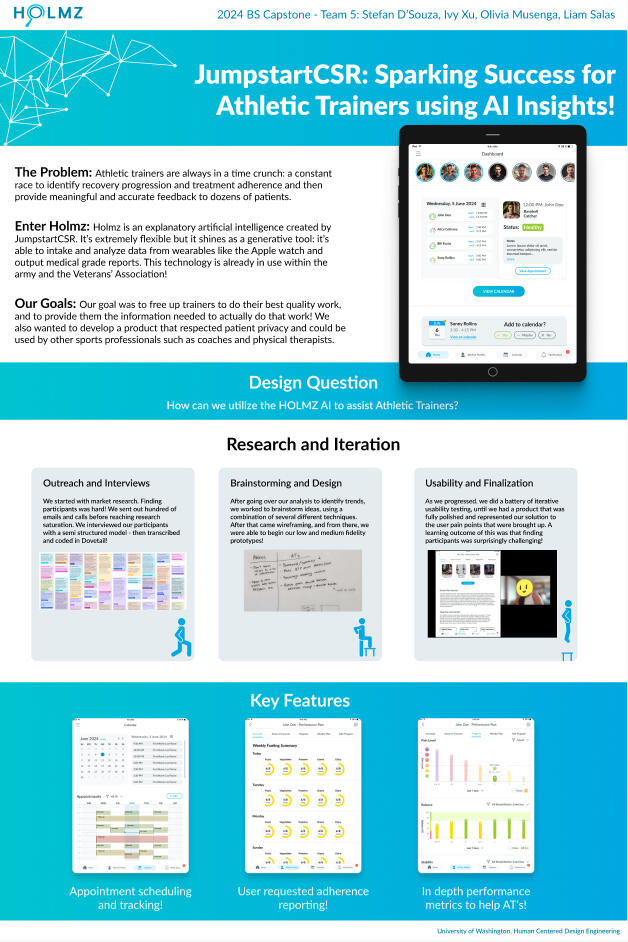
Our poster of our HCDE Capstone Showcase Event!
Conclusion
Next Steps
The next step would be to begin developing the actual app using the UI which we have designed. This would be JumpStartCSR’s decision about whether to use our decision
suggestions based on the user research we have conducted. One of the largest changes we have made to the original UI was switching the focus to an “all-in-one” tool
rather than exclusively reporting the results from Holmz. We hope that this change will allow JumpStartCSR to reach a wider range of users. Additionally, we suggested that,
if this UI were to be implemented, our calendar features could be connected to Outlook or Google calendar for greater convenience.
If given more time, we would have worked on developing a UI for the athlete-side (or patient-side). From the UI we were provided, it contained much less information than
the provider-side and we believe that any insights from Holmz should be available to the athlete as well. Additionally, we would like to add the ability for athletes to
self-report about sleep, fuel, hydration, and mental, which are four categories emphasized by the ATs we interviewed and not heavily considered by JumpStartCSR previously.
Ethical Considerations
Privacy: Every person we talked to in our interviews raised concerns about athlete privacy, particularly the impact of collecting information outside of practice as was
suggested by our sponsor. We proposed that the AT is only able to view information which has specifically been shared by the athlete. This would promote the idea of
trust between the athlete and AT.
Accuracy: There is additionally a lot of skepticism for AI within the medical field. We wanted to frame any information generated by the AI as suggestions rather than
fact and offer the AT the ability to edit anything which they want, as an AT’s expertise should come first.